
Download PDF Image Extractor – Extract Images from PDF, Free, Secure, Utility Tool
Overview
PDF Image Extractor is a specialized utility designed to address a common digital challenge: retrieving embedded images from PDF documents. While PDFs are widely used for sharing formatted content, their structure often makes image extraction difficult without the right tools. This application offers a direct solution by enabling users to extract images with minimal effort.
It is particularly useful for students compiling visual references, professionals preparing presentations, or creatives repurposing content from digital documents. The app operates as a free Windows-based tool, eliminating cost barriers and making it accessible to a broad audience. Although the developer’s background is not publicly detailed, the tool has been available since 2008, indicating a long-standing presence in the digital productivity space.
Its consistent functionality over time suggests reliability and stability. Real-world use cases include extracting charts from research papers, retrieving logos from reports, or harvesting illustrations from e-books. In the broader app ecosystem, PDF Image Extractor fills a niche gap—offering a focused, no-frills solution where general-purpose tools may fall short.
Its enduring relevance underscores the ongoing need for efficient, dedicated utilities in document management workflows.
Key Features & Functionality
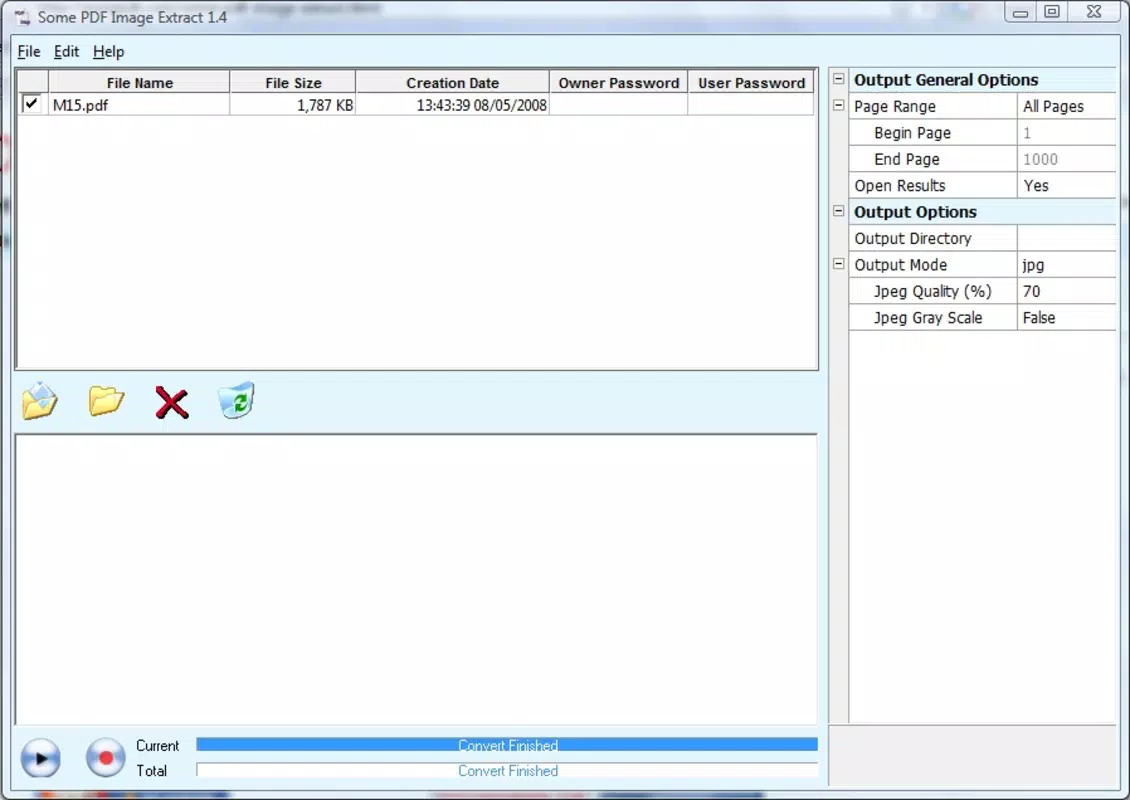
- User-Friendly Interface: The application features a clean, intuitive layout that requires no technical expertise. Users can open a PDF file directly through the interface and begin the extraction process without complex setup or configuration.
- Batch Image Extraction: PDF Image Extractor automatically detects all embedded images within a selected document and presents them in a list. Users can select multiple images simultaneously, enabling bulk extraction and significantly reducing processing time.
- Format and Quality Options: Extracted images can be saved in various formats and quality levels. This flexibility allows users to tailor outputs—high-resolution for print, compressed for web use—without requiring additional conversion tools.
- Free of Charge: The tool is fully free to use, with no trial periods, subscriptions, or hidden fees. This makes it an accessible option for individuals and organizations seeking cost-effective solutions.
- Quick Processing: Files are processed rapidly, with most extractions completed in seconds. This efficiency is especially valuable when handling multiple documents or time-sensitive tasks.
For example, a researcher could extract all figures from a lengthy academic paper in one go, saving them in PNG format for inclusion in a presentation. A designer might use the tool to harvest high-quality visuals from client reports for a creative project. These practical applications demonstrate how the tool enhances productivity by removing manual barriers to content reuse.
Interface, UX & Performance
The interface of PDF Image Extractor is minimalistic and functional, prioritizing ease of use over visual flair. Navigation is straightforward: users open a PDF file, view a list of detected images, select desired ones, and export them with a few clicks. The layout avoids clutter, ensuring that core functions remain accessible.
Although the developer did not list formal performance metrics, the application is described as quick and responsive, with processing times measured in seconds. This suggests optimized file handling and efficient memory usage. The tool appears stable during typical operations, with no reported crashes or freezes in available documentation.
However, specific requirements for device compatibility, such as RAM or CPU specifications, were not disclosed. The application’s performance on older or low-end systems remains unverified. Users can expect consistent behavior across standard Windows environments, but no guarantees are made for non-standard configurations.
Overall, the user experience is streamlined for efficiency, focusing on a single task with minimal distractions. This focused design enhances usability, especially for users who value speed and simplicity over advanced customization.
Platform Compatibility & Technical Requirements
PDF Image Extractor is designed for the Windows operating system. The application’s file size and version are not specified in the provided information. The developer did not list minimum OS requirements or hardware specifications.
Compatibility with modern Windows versions such as Windows 10 or 11 is assumed based on the tool’s long-standing presence, but this has not been officially confirmed. The application is not available on mobile platforms, including Android or iOS. Users seeking a mobile solution would need to explore alternative tools.
The absence of detailed technical requirements means users should exercise caution when installing on older or less common systems. While the tool is free and reportedly stable, it is recommended to run it on a trusted device with up-to-date security software. The lack of official compatibility details limits the ability to assess suitability for enterprise or high-security environments.
Pros and Cons
- Completely free to use with no hidden costs
- Efficient batch extraction of multiple images at once
- Supports multiple output formats and quality settings
- Fast processing time for quick results
- Simple, intuitive interface suitable for all skill levels
- Not available on mobile platforms (Android, iOS)
- Developer did not provide detailed system requirements
- Only supports Windows, limiting cross-platform use
- No built-in preview of extracted images before export
- Longevity does not guarantee modern security standards
FAQ
Is PDF Image Extractor safe to download and use?
The tool is described as free and functional, but the developer did not provide security certifications or digital signatures. Users should download it from official sources and scan the file with up-to-date antivirus software.
Can I extract images from password-protected PDFs?
The provided information does not specify whether the tool supports encrypted or password-protected PDFs. It is recommended to test the application with such files to determine compatibility.
Is there a mobile version available?
PDF Image Extractor is currently only available for Windows. There is no official mobile version for Android or iOS.
How do I update the software?
Updates are not mentioned in the provided details. Users should check the official website periodically for new releases or version announcements.
Does the app support batch processing?
Yes, the application supports batch extraction, allowing users to select and extract multiple images from a single PDF file at once.
Final Thoughts
PDF Image Extractor stands out as a reliable, no-cost solution for extracting images from PDFs on Windows. Its straightforward interface, fast performance, and support for batch processing make it a valuable tool for students, professionals, and creatives who frequently work with digital documents. While it lacks mobile availability and detailed technical specifications, its focused functionality delivers tangible value without complexity.
For users needing a quick, secure, and free way to retrieve visual content from PDFs, this tool remains a practical choice. The long-standing presence of the application speaks to its stability and continued relevance. If your workflow involves frequent image extraction from PDFs, this utility offers a dependable, cost-effective alternative to more complex software.
Download PDF Image Extractor now.


